Many people feel confused about PNG and JPG. These are two common image file types, and you see them everywhere—on phones, websites, and social media.
They look similar, and both are used for pictures. So it can be hard to know which one to choose.
The good news is that the difference is simple. Each format is better for a different purpose. Once you understand this, you will always choose the right one.
Quick Answer
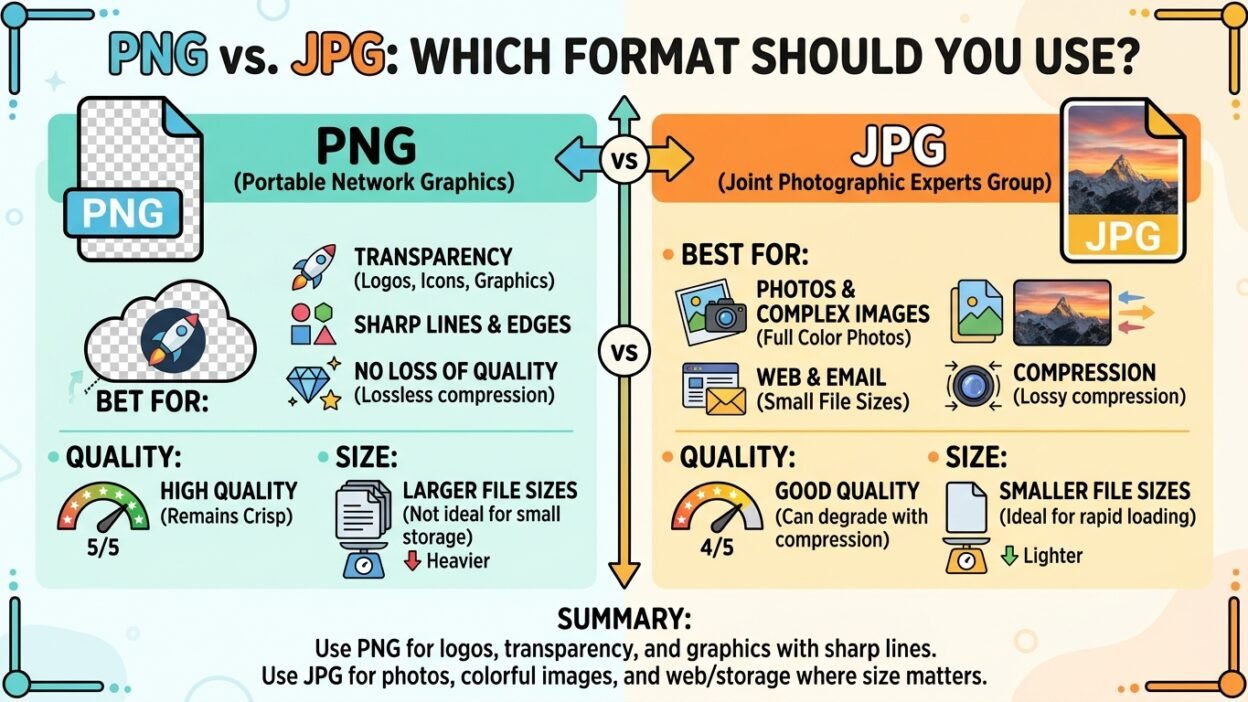
- ✅ PNG = best for high quality and clear images (no quality loss)
- ✅ JPG (or JPEG) = best for smaller file size and photos
- PNG keeps full detail
- JPG reduces size but loses some quality
Simple idea:
👉 PNG = quality
👉 JPG = smaller size
Simple Origin or Background Explanation
Both PNG and JPG are image file formats used to store pictures on computers and phones.
JPG (JPEG)
- Full name: Joint Photographic Experts Group
- Created to store photos in a smaller size
- Uses compression (reduces file size)
PNG
- Full name: Portable Network Graphics
- Created later to improve image quality
- Keeps full detail without losing quality
👉 So:
- JPG = smaller files
- PNG = better quality
Clear Explanation of the Difference
What is JPG?
JPG is used mainly for photos.
It reduces file size by removing some image data. This makes the file smaller but slightly lowers quality.
Good for:
- Photos from camera
- Social media images
- Websites (fast loading)
Examples:
- A photo of a person
- A landscape picture
What is PNG?
PNG keeps full image quality. It does not remove data.
It also supports transparent backgrounds, which JPG cannot do.
Good for:
- Logos
- Graphics
- Images with text
- Transparent images
Examples:
- A logo with no background
- A design with text
Key Idea
- JPG = smaller but lower quality
- PNG = larger but higher quality
Comparison Table
| Feature | PNG ✅ | JPG ✅ |
|---|---|---|
| Quality | High (no loss) | Lower (some loss) |
| File size | Larger | Smaller |
| Transparency | Yes | No |
| Best for | Graphics, logos | Photos |
| Compression | No quality loss | Lossy compression |
Which One to Use and When
Use JPG when:
- You are saving photos
- You want smaller file size
- You need faster upload or download
Examples:
- Travel photos
- Profile pictures
- Social media posts
Use PNG when:
- You need clear and sharp images
- You want transparency (no background)
- You are working with text or design
Examples:
- Logos
- Icons
- Screenshots
Simple Rule
👉 Photo → JPG
👉 Design or text → PNG
Common Mistakes People Make
1. Using JPG for logos
❌ Logo looks blurry or has a white background
✅ Use PNG for clear and transparent logos
2. Using PNG for large photos
❌ Very large file size
✅ Use JPG to save space
3. Not understanding transparency
Only PNG supports transparent backgrounds.
4. Thinking one format is always better
Both formats are useful just in different situations.
Everyday Real Life Examples
In Emails
- Use JPG for sending photos quickly
- Use PNG for sending clear designs
On Social Media
- Photos → JPG
- Logos or stickers → PNG
In News or Websites
- JPG for article images (faster loading)
- PNG for icons and graphics
In Daily Use
- Camera photos → JPG
- Screenshots → PNG
Short Learning Section for Students and Beginners
Here are easy tips to remember:
Tip 1: The Quality Rule
👉 PNG = better quality
Tip 2: The Size Rule
👉 JPG = smaller size
Tip 3: The Transparency Rule
👉 Only PNG supports transparent background
Practice Questions
Choose the correct format:
- A company logo → ______
- A phone photo → ______
- An image with no background → ______
Answers:
- PNG
- JPG
- PNG
FAQ
1. Which is better: PNG or JPG?
It depends on your need. PNG for quality, JPG for size.
2. Is JPG the same as JPEG?
Yes, they are the same format.
3. Does PNG lose quality?
No, PNG keeps full quality.
4. Why is JPG smaller?
Because it removes some image data.
5. Can JPG have a transparent background?
No, only PNG supports transparency.
6. Which is best for photos?
JPG is best for photos.
7. Which is best for logos?
PNG is best for logos.
8. What is the easiest way to choose?
👉 Photo → JPG
👉 Design → PNG
Conclusion
The difference between PNG and JPG is simple once you understand it.
- PNG = high quality, larger size, supports transparency
- JPG = smaller size, good for photos
👉 Use PNG for clear graphics and logos
👉 Use JPG for photos and smaller files
With this simple rule, you can always choose the right format for your images.